> For the complete documentation index, see [llms.txt](https://docs.bonkbot.io/llms.txt). Markdown versions of documentation pages are available by appending `.md` to page URLs; this page is available as [Markdown](https://docs.bonkbot.io/bonkbot/advanced-trading/limit-orders/trailing-stop-loss.md).
# Trailing Stop Loss
{% hint style="info" %}
A **Trailing Stop Loss** is an advanced order type that automatically adjusts the stop price as the market moves in your favor. **This allows you to secure profits while minimizing potential losses if the price drops.**
{% endhint %}
With BONKBot, you can easily set a trailing stop loss during a sell order, and it will dynamically follow price increases while protecting your position.
**How Trailing Stop Loss Works:**
* A **Trailing Stop Loss** is set as a percentage or multiple below the current market price.
* As the token price increases, the trailing stop follows the price movement upwards, maintaining the set distance (either a percentage or price gap)
* If the price drops by the specified amount or percentage, the stop loss triggers and sells your tokens, thus limiting losses or locking in gains.
**Steps to Set a Trailing Stop Loss:**
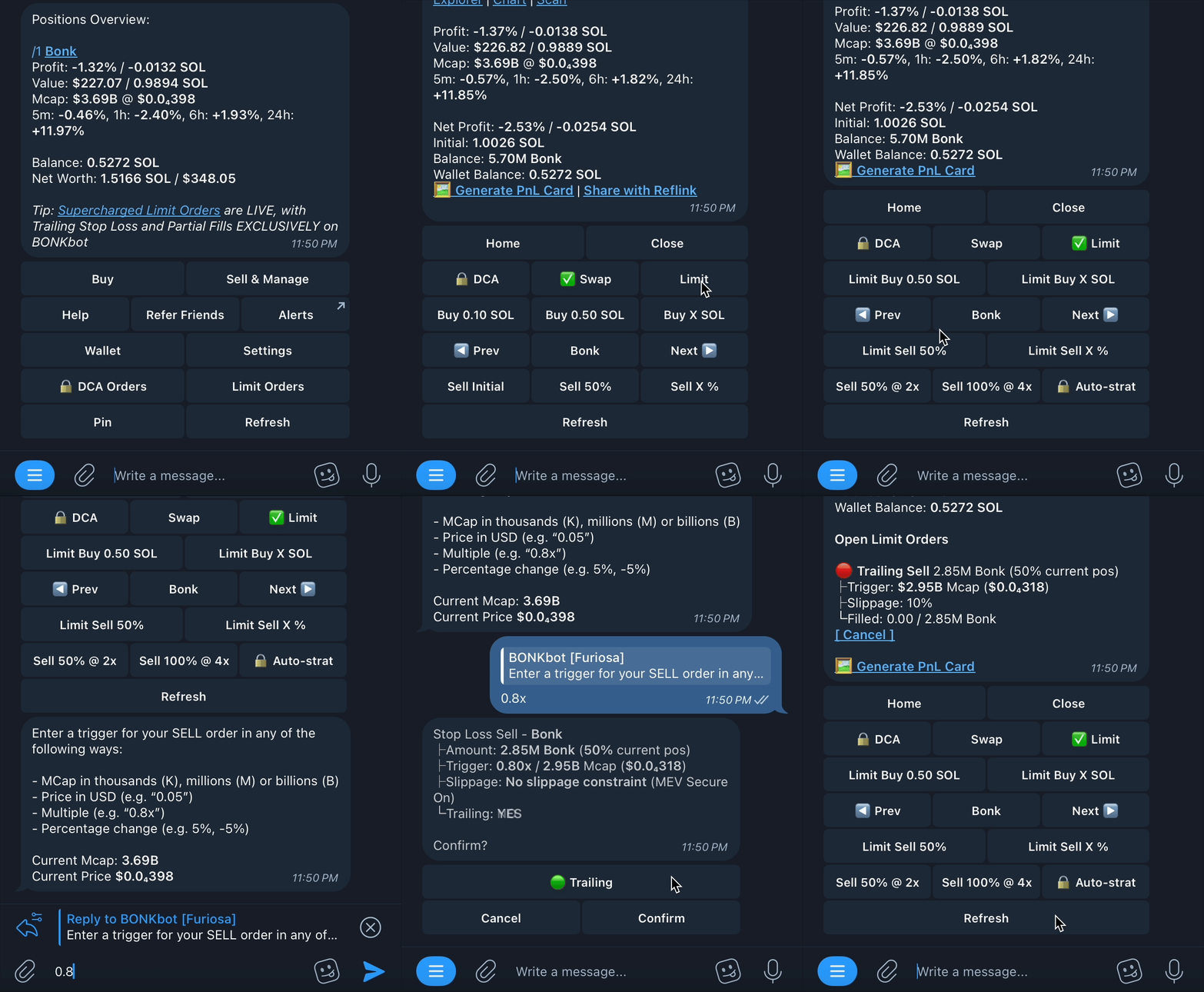
1. Select the **Limit** option in the main menu and then choose **Limit Sell %**.
2. Enter the **amount** of your position you want to protect with the trailing stop (e.g., 50% of your current position).
3. You will be asked to specify a **trigger condition**. This will determine how far below the current price the trailing stop will initially be placed. For example:
* **Percentage change**: Enter a percentage (e.g., "5%"). This means the trailing stop will follow the token’s price upward at a distance of 5%
* **Multiple:** Enter a multiple (e.g. "0.8x")
4. Confirm the details of the trailing stop order and adjust slippage if needed.
Live example of a trailing stop loss
* **Trigger**: 0.8x market cap
* **Amount**: 2.85M Bonk, 50% of the current position.
* **Slippage**: No slippage constraint
* **Trailing**: Enabled (indicated by the green "Trailing" button).
This trailing stop order will sell 50% of the user’s position if the market cap falls to 0.8x from any local high.
Once confirmed, this trailing stop will adjust upwards with any market cap increase but will trigger if the token’s market cap drops below the threshold.
For example, if $BONK were to rally from 3.69B (market cap at the time of order creation) straight up to 5B without any pullbacks, the trigger price would move up as well from 2.95B (3.69 x 0.8) to $4B (5 x 0.8). If 5B acted as a local top in this case, a drop to $4B market cap would trigger the 50% sell order.
.png)